




EnquiryOS / Workflow 04
Enquiry overdue monitor
Find eligible enquiries still marked New, send one consolidated reminder and record which requests were included.
Demo with sample data, not client work.
About this workflow
An automated email can be sent while a quotation or business decision is still outstanding. The overdue monitor keeps that human work visible by checking the enquiry tracker on a schedule.
The demonstration checks approximately every minute and uses a two-minute threshold. That short window simulates a longer operating policy, such as the next business morning. Production timing should be configurable.
- System
- Axelyn EnquiryOS
- Tools
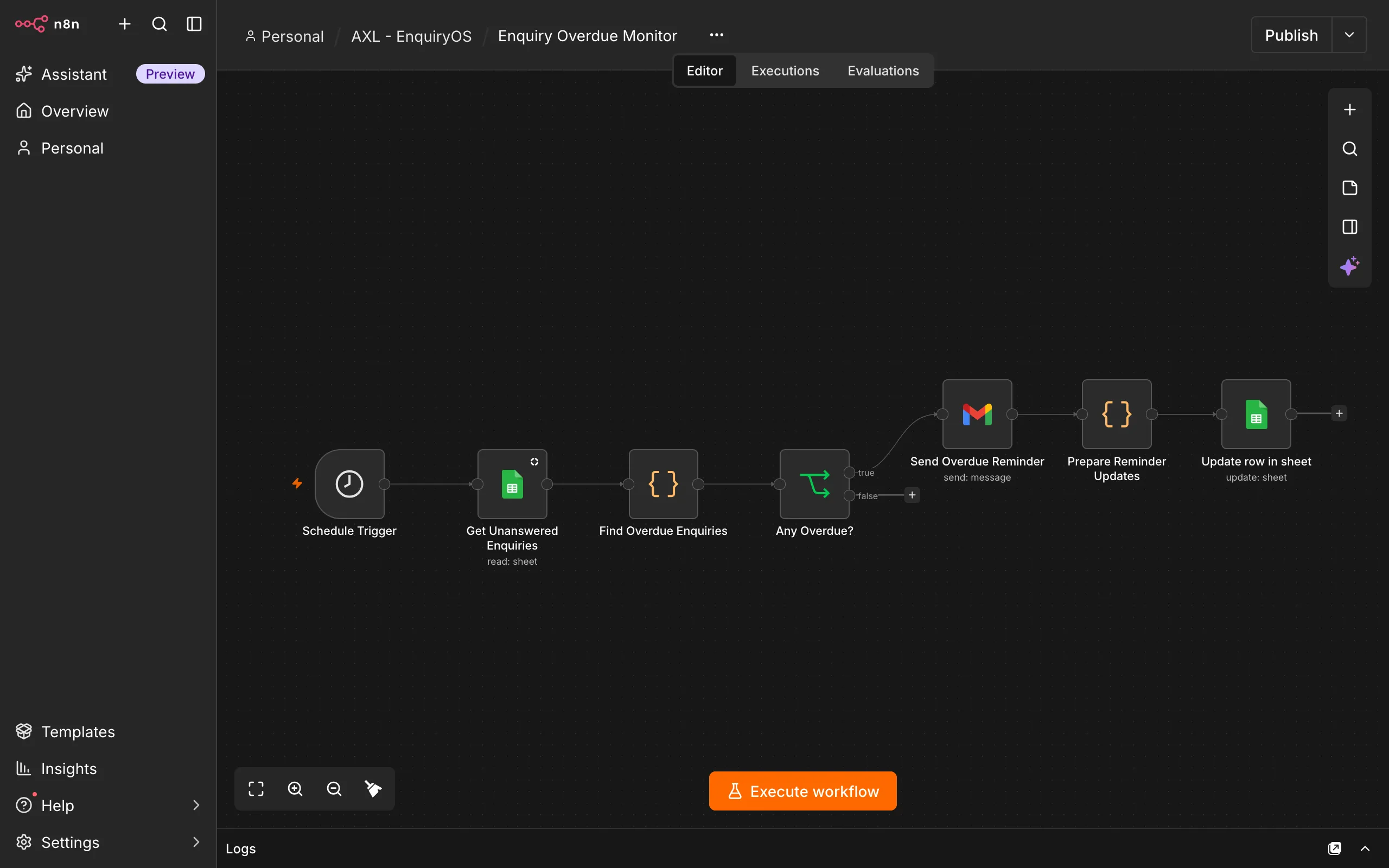
- Schedule Trigger · Google Sheets · Gmail
How it works
Read the unresolved queue
The Schedule Trigger starts a check of enquiries still marked New. Duplicate records and records with a reminder already logged are excluded.
Find eligible overdue requests
Compare the waiting time with the configured threshold. If no enquiry qualifies, end the run without sending a reminder.
Send one consolidated reminder
Prepare one owner email containing the eligible customer names, email addresses, requests, waiting times and links to their records.
Retain the reminder outcome
After Gmail accepts the reminder, update reminder_sent_at for each included enquiry. Marking an enquiry Replied removes it from later unresolved checks.
What the owner sees
The owner receives one list of enquiries that still need action, rather than a separate reminder email for every request.
The tracker remains the operating view. Once the owner has actually responded, they update the human-handling status to Replied.
Boundaries & recovery
Email sending and spreadsheet updates are separate operations. If sending succeeds but reminder_sent_at fails to update, a later run could send the reminder again.
Exactly-once notification semantics have not been established. Normal-operation suppression and recovery after partial failure must be tested separately. Reminders cannot guarantee that the owner will act.
Acceptance checks
These checks cover the workflow’s inputs, outputs and recovery paths.
- Only eligible New enquiries older than the threshold enter the reminder.
- Duplicates and previously reminded enquiries are excluded.
- One email contains all eligible overdue enquiries and correct record links.
- Successful reminder acceptance is followed by timestamps for every included record.
- Marking Replied excludes the enquiry from later checks.
- A failed tracking update after a successful send is visible and has an explicit recovery procedure.