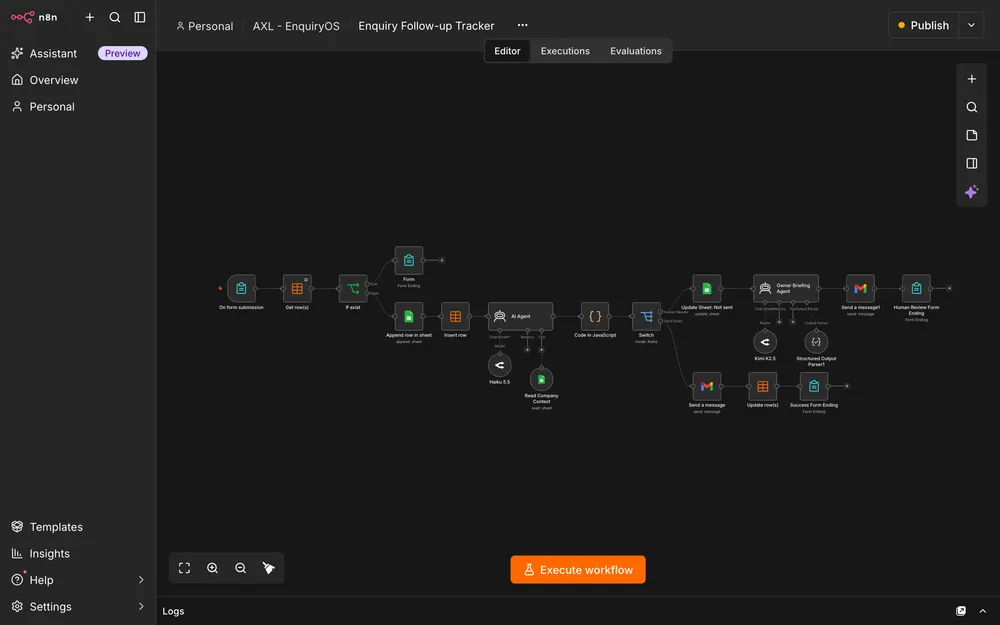
Demo with sample data, not client work. The preview shows EnquiryOS’s intake workflow.
Our process
From repetitive steps to a connected workflow.
See the weeks, the review points and what each stage produces. Orange and navy show Axelyn’s work; grey shows your part.
Illustrative planning schedules, not delivery commitments. The enquiry setup adapts an existing workflow; custom automation has its own scope and quotation. Account access, company information and acceptance results determine the agreed release date.
EnquiryOS introductory setup Example 1-week plan
Configure an agreed selection of existing EnquiryOS workflows for one business, then verify the included paths before release
Scroll across the schedule, then select a stage to see its deliverables.
Example 1-week plan. Planning example for configure an agreed selection of existing enquiryos workflows for one business, then verify the included paths before release.
Provide the company information the system may use, connect your accounts and name the person who handles follow-up. Review representative enquiries and replies.
Review outcomes
Approved company knowledge
Named owner and reviewed examples
Agree the scope · Week 1
Rules & responsibilities
Agree what can receive an automated reply, what needs human attention, the duplicate window and the reminder threshold. Confirm third-party costs and operational ownership.
What you receive
Reply and escalation rules
Account, cost and support responsibilities
Configure · Week 1
Connect & configure
Preserve the existing architecture. Configure the form, Google Sheets tracker, Data Table registry, company knowledge, OpenRouter model and Gmail account for the agreed business.
What you receive
Configured enquiry workflow
Owner briefing and tracker
Verify & hand over · Week 1
Acceptance checks
Test new enquiries, duplicates, human review, sent-email status, reminders and a deliberately broken connection. Record any gaps before presenting the setup as ready for use.
What you receive
Acceptance results and known limits
Recovery and operating notes
Verify & hand over · Week 1
Measure & hand over
Record observed response latency and explain how to maintain company information, update human-handling status and recover failed work. Ongoing support requires a separate agreement.
What you receive
Measured baseline
Owner walkthrough and handover
Custom workflow Example 2-week plan
One repeatable process with agreed inputs, connections, exception handling and acceptance checks
Scroll across the schedule, then select a stage to see its deliverables.
Example 2-week plan. Planning example for one repeatable process with agreed inputs, connections, exception handling and acceptance checks.
Show the current steps and representative inputs. Confirm authorised access to the tools involved and who acts on exceptions.
Review outcomes
Process examples and access plan
Named operational owner
Your part · Week 2
Review & acceptance
Review the outputs, failure cases and recovery steps against the agreed acceptance criteria.
Review outcomes
Acceptance review
Confirmed operating responsibilities
Map & scope · Week 1
Workflow plan
Define one process, its named integrations, record structure, duplicate handling and human decisions. Agree the release boundary and a separate quotation.
What you receive
Workflow and integration map
Scope, quotation and acceptance checks
Build · Weeks 1–2
Connect & route
Implement the agreed n8n workflow with deterministic validation, routing and persistence. Use AI only where drafting or classification helps the defined task.
What you receive
Connected workflow
Visible progress and exception records
Verify & hand over · Week 2
Checks & handover
Exercise representative inputs, duplicates and provider failures. Verify alerts and recovery, then hand over workflow exports, configuration notes and operating guidance.
What you receive
Verification record
Workflow export and runbook
What the work covers
Useful automation. Visible responsibility.
The aim is to reduce routine administration while giving the owner a clear view of completed steps, outstanding work and problems.
One defined process
Map the trigger, inputs, outputs and exceptions. Start with a process your team repeats and agree what a successful run should produce.
Tool connections & data synchronization
Automate the handoffs between the agreed forms, spreadsheets, email and APIs using n8n. Keep account access and third-party costs explicit.
Reliable capture & duplicate checks
Validate inputs, retain the original record and check for repeated submissions before triggering unnecessary work.
Useful replies & human handoffs
Where AI helps, ground drafts in approved company information. Route quotations, uncertain answers and decisions to the owner with a concise briefing.
A tracker people can use
Show what arrived, what the automation did and what still needs attention. Keep automated email status separate from human-handling status.
Failures, recovery & handover
Make failed steps visible, agree an alert destination and document how to recover. Hand over the workflow, configuration and operating guidance.
Pricing
Start with EnquiryOS. Agree the workflows you need.
An introductory setup for one business, or a separately scoped workflow for a different process.
Approximate conversions, rounded to whole units. Frankfurter exchange rates dated . Final fees and billing currency are confirmed in your quotation.
Introductory package
EnquiryOS introductory setup
A one-time EnquiryOS configuration for one business, with the included workflows agreed before quotation and release.
RM290/ one-time setup
Base price: RM290
One business · Included workflows agreed in your quotation
✓Enquiry tracker, internal registry and company knowledge
✓Selected reply, escalation and reminder configuration
✓Agreed owner notifications and dashboard configuration
✓A written list of the workflows included in the quotation
✓Initial testing, operating notes and owner handover
The setup fee does not automatically include the full five-workflow system. Exact included workflows are confirmed before quoting. Extra channels, custom integrations, migration, ongoing monitoring and maintenance require separate scope. Release requires agreed acceptance checks.
A process shaped around your business
Custom workflow
Connect an agreed set of tools and automate one repeatable process with clear outputs, exception handling and ownership.
Scoped quotation
Scope, fees and delivery dates agreed in a proposal
✓Validation, routing and duplicate handling where needed
✓Human decisions and exception paths
✓Agreed monitoring, alerts and recovery steps
✓Workflow export, configuration notes and handover
Additional workflows, new applications, extra channels and continuous operations need their own scope. AI is included only where it supports the agreed task.
The RM290 fee is for one-time configuration, not a monthly managed service. The included workflows must be finalized before a quotation. n8n hosting or subscription, model/API usage and any email or integration charges are paid separately by the business. Gmail account limits still apply. Ongoing maintenance, monitoring responsibilities and support must be agreed separately. Final scope, fees and billing currency are confirmed in a quotation.
Before a workflow is handed over
Check the routine path. Then the exceptions.
The agreed checks cover enquiry capture, reply routing, follow-up, reminders and recovery.
Capture & duplicate suppression
A valid enquiry is stored once. Matching email and enquiry text within five minutes do not trigger a second AI email. Different requests continue normally.
Company context & reply decisions
Check answers against maintained company information. Unsupported facts must not be invented, and a withheld reply must not be sent.
Human attention stays visible
A quotation request gets an actionable briefing. An AI email marked Sent does not close the owner’s outstanding work.
Reminders without repetition
An overdue request appears in a consolidated reminder once per unchanged enquiry. Marking it Replied excludes it from future reminders.
Provider failures & recovery
Break a connection deliberately. Confirm that the affected record, error and recovery action remain visible and that a functioning alert route reaches the owner.
Measured performance
Record capture and failure rates, median and 95th-percentile response latency, and manual effort before and after automation. No time-saving percentage is claimed without measurements.
Before we start
Questions about n8n automation.
Work directly with Amin to define the process, the tools it connects and the decisions that remain with your team.
What can I explore in the workflow collection?+
The first system is Axelyn EnquiryOS, with five workflow cards for error monitoring, enquiry intake, customer replies, overdue follow-up and daily performance reporting. Each page explains the workflow’s purpose, process and owner handoff. The demonstration uses sample Northstar Web Studio information, not client work.
What does the RM290 package cover?+
The introductory fee is RM290 for a tightly scoped one-time EnquiryOS configuration for one business. The included workflows, form, tracker, company knowledge, reminder policy, dashboard and handover must be agreed before quoting. The fee does not automatically include all five workflows. Suitability and release readiness must be confirmed first. This is not an ongoing managed service, and additional channels or custom development require a separate quotation.
Are n8n, model usage and email costs included?+
No. The business provides and owns the connected accounts. n8n hosting or subscription, OpenRouter model usage and any email or integration charges are separate from the setup fee. Gmail sending limits apply. The proposal records who pays each bill, maintains company information, receives alerts and operates the workflow. Ongoing support is agreed separately.
Will every enquiry receive an AI reply?+
No. The workflow checks whether a reply is appropriate. Repeated identical submissions are suppressed within the configured duplicate window, and uncertain requests or decisions can go to human review. The AI uses a read-only company knowledge source and must not invent services, prices, timelines or policies. n8n controls validation, routing, storage and sending.
Does an automated reply mean the enquiry is completed?+
No. AI email status and human-handling status are separate. A customer can receive an automated email while the enquiry remains New because a quotation or decision is still needed. The owner sees what was sent, what remains unresolved and the next action. Only the appropriate human action closes that work.
How quickly does it respond, and how much time will it save?+
The engineering target is for 95% of successfully processed eligible enquiries to reach Gmail acceptance within 60 seconds of a valid form submission. This is not a verified guarantee or an inbox-delivery promise. Human follow-up depends on the business. No measured time-saving percentage is available yet; manual handling and post-automation human effort must be compared before making a claim.
Can you automate a different process or support an existing n8n workflow?+
Yes. Describe the steps, tools, inputs and outcome you need. We can review an existing workflow or scope one process separately, preserving working architecture where practical. Custom integrations, additional channels, ongoing maintenance and support have their own agreed scope, costs and responsibilities.





 Built with n8n