




EnquiryOS / Workflow 01
Error monitor
Turn an unhandled execution error into an owner alert with the failed workflow, node, error and investigation reference.
Demo with sample data, not client work.
About this workflow
The error monitor is the intended central alert route for unhandled failures across EnquiryOS. Its job is to make a problem visible before an owner assumes the enquiry has been processed.
An alert should identify the affected workflow and failed step, explain the error and provide enough context for investigation. Detecting the failure does not establish that recovery has succeeded.
- System
- Axelyn EnquiryOS
- Tools
- n8n Error Trigger · Code · Gmail
How it works
Receive an execution failure
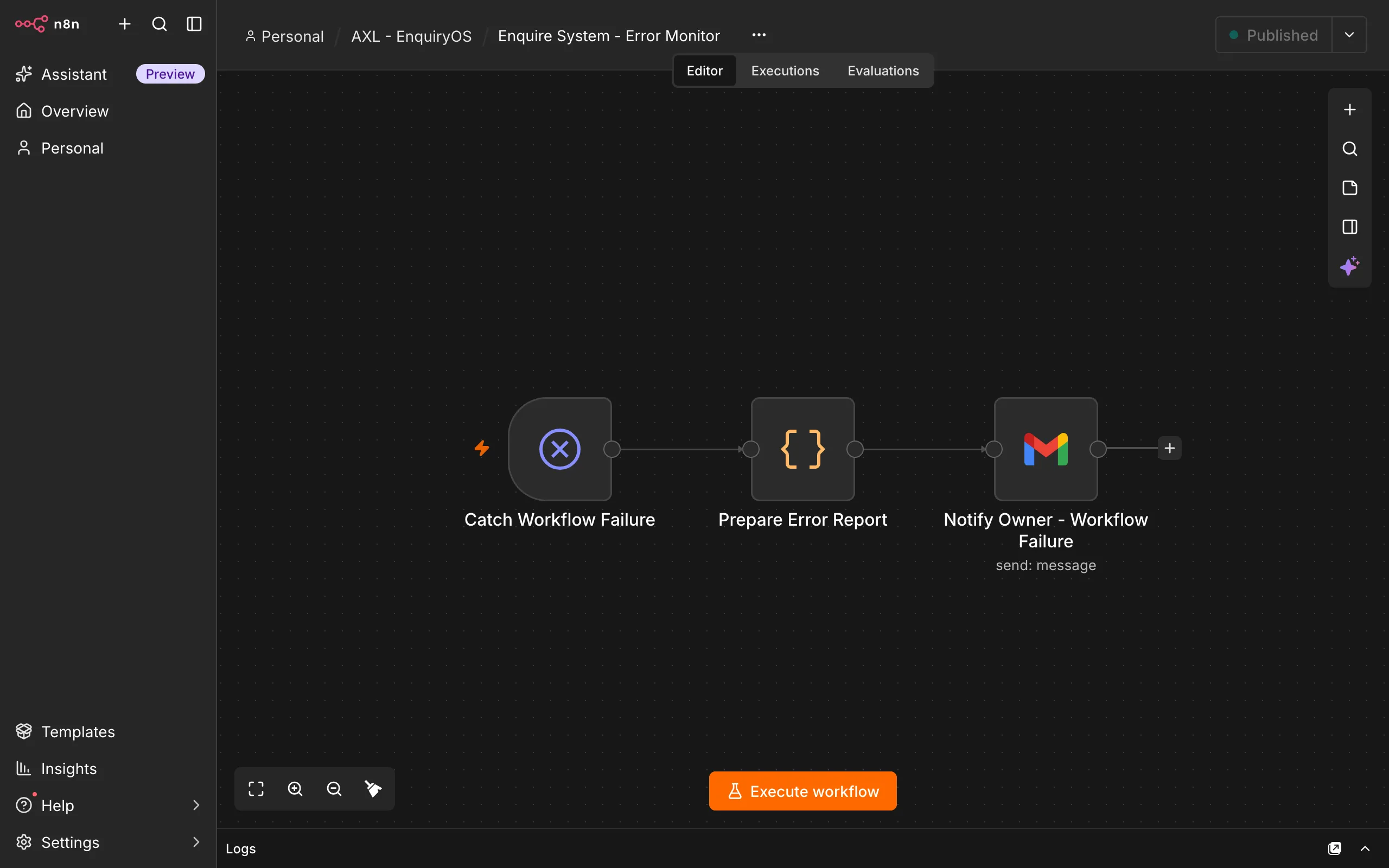
An n8n Error Trigger receives an unhandled failure event from another configured EnquiryOS workflow.
Extract the useful context
A Code node prepares the workflow name, failed node, error description, execution time and execution URL when one is available.
Notify the owner
Gmail sends an actionable alert explaining what failed, which request may need attention and where the owner can investigate.
What the owner sees
The owner should receive a concise explanation rather than a raw execution dump: the failed workflow, failed node, error, timestamp and recommended investigation steps.
An execution link is included when the event supplies one. A missing reference must not be invented. Recovery remains an explicit operational task.
Boundaries & recovery
A Gmail-only alert path shares a failure dependency with customer email. If Gmail is unavailable, the notification can fail too. An independent production alert channel should be considered and tested.
The monitor detects failures; it does not guarantee that every error is delivered or that the original enquiry is recovered. Record ownership and the recovery procedure before release.
Acceptance checks
These checks cover the workflow’s inputs, outputs and recovery paths.
- A deliberate failure in a configured workflow produces an error event.
- The alert identifies the actual workflow, failed node, timestamp and error.
- An available execution reference opens the correct failed execution.
- Alert-channel failure is tested and its limitation is recorded.
- A named owner can investigate and recover the affected request without repeating completed sends.