




EnquiryOS / Workflow 05
Daily performance report
Pair the live Owner Dashboard with a proposed daily email covering recorded activity, open enquiries and data-quality issues.
Demo with sample data, not client work.
About this workflow
This workflow has two complementary surfaces: a live Owner Dashboard in Google Sheets and a proposed daily performance email. The dashboard already exists; the scheduled email has a different implementation status.
The owner should be able to understand enquiry activity without opening individual n8n executions. Reporting must separate activity during the reporting window from the queue that is still open now.
- System
- Axelyn EnquiryOS
- Tools
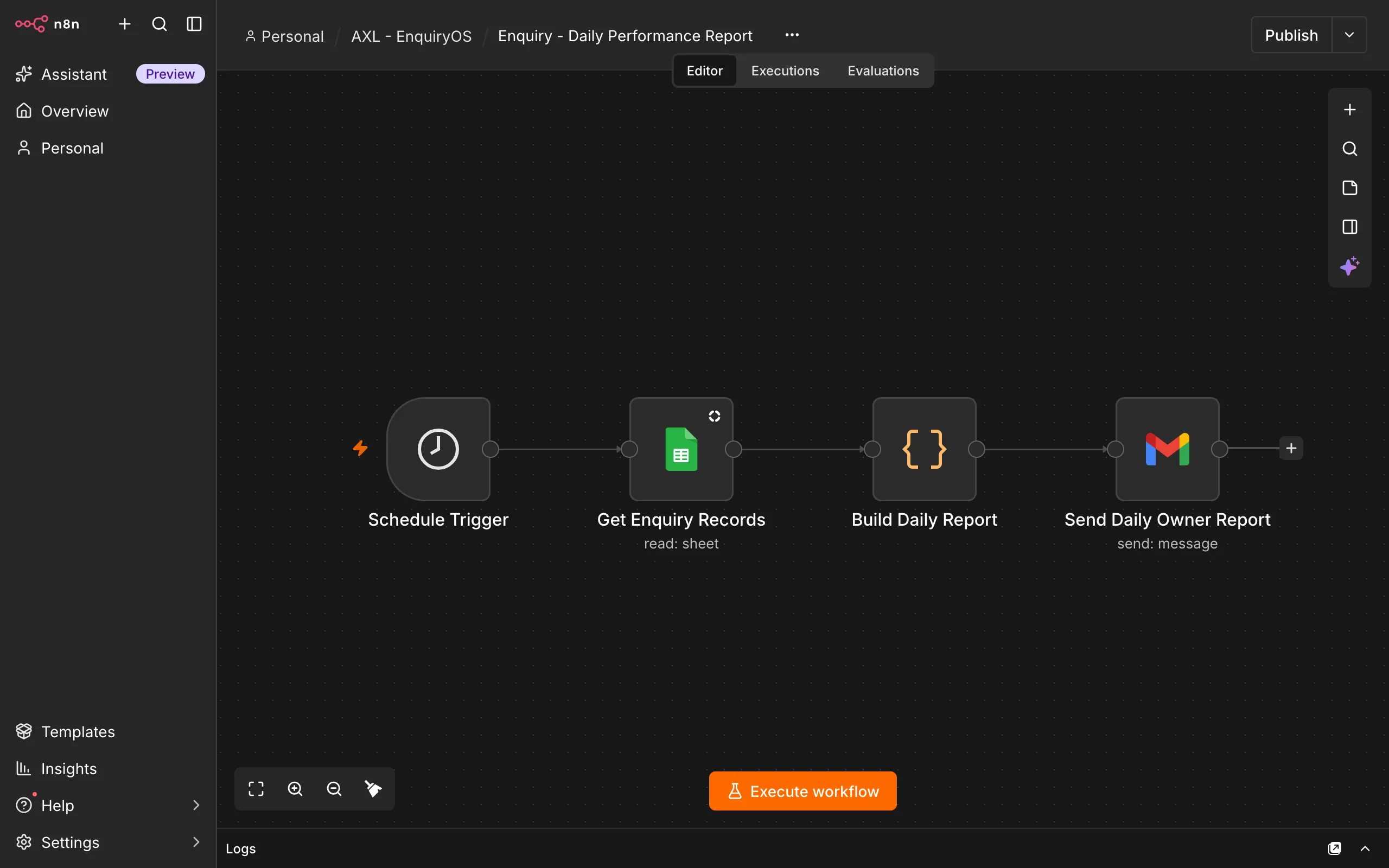
- Google Sheets · Schedule Trigger · Code · Gmail
How it works
Read the enquiry records
The proposed Schedule Trigger runs at 6:00 PM Malaysia time and reads the Enquiries sheet. This schedule is a proposal, not a confirmed live deployment.
Calculate activity and current workload
A Code node would calculate enquiries received in the preceding 24 hours, logged responses, Replied records, human-review workload and the current outstanding queue.
Expose missing or incomplete data
Report missing enquiry IDs, email statuses and follow-up decisions. Include response-time measurements only when the required timestamps are available.
Send the owner summary
The proposed Gmail step would deliver the report with important open enquiries and reminded requests that remain unresolved. End-to-end delivery still needs to be confirmed.
What the owner sees
The live dashboard covers total enquiries, New and Replied counts, unresolved reminded requests, recorded email outcomes, human follow-up flags, duplicates and data-quality gaps.
The daily email is intended to summarise recent activity alongside current outstanding work. Missing measurements must remain visible as missing, rather than being presented as zero failures or successful outcomes.
Boundaries & recovery
Dashboard counts depend on accurate workflow writes. Formula checks do not prove that upstream records are complete or that the reporting workflow has run.
Do not publish a response-speed or time-saving result without the underlying measurements. A report records observed operations; it does not establish sales or revenue improvements.
Acceptance checks
These checks cover the workflow’s inputs, outputs and recovery paths.
- Dashboard totals agree with a controlled set of enquiry records.
- New, Replied, reminded and human-follow-up counts use the intended definitions.
- A reporting window separates the preceding 24 hours from the current open queue.
- Missing IDs, statuses and measurements are reported without fabricated values.
- The Malaysia-time schedule and Gmail report delivery are tested after the email workflow is created.
- The report includes actionable open enquiries and correct record links.