




EnquiryOS / Workflow 03
Customer reply handler
Match incoming Gmail replies to registered enquiries, read the conversation and route a relevant continuation or owner briefing.
Demo with sample data, not client work.
About this workflow
The reply handler continues an existing enquiry when the customer responds by email. It uses the registered Gmail thread and conversation history so the discussion does not restart after every message.
A safe customer response and a useful owner briefing can both be needed. Those are independent routing decisions; sending one must not silently discard the other.
- System
- Axelyn EnquiryOS
- Tools
- Gmail · Data Tables · OpenRouter
How it works
Match the registered conversation
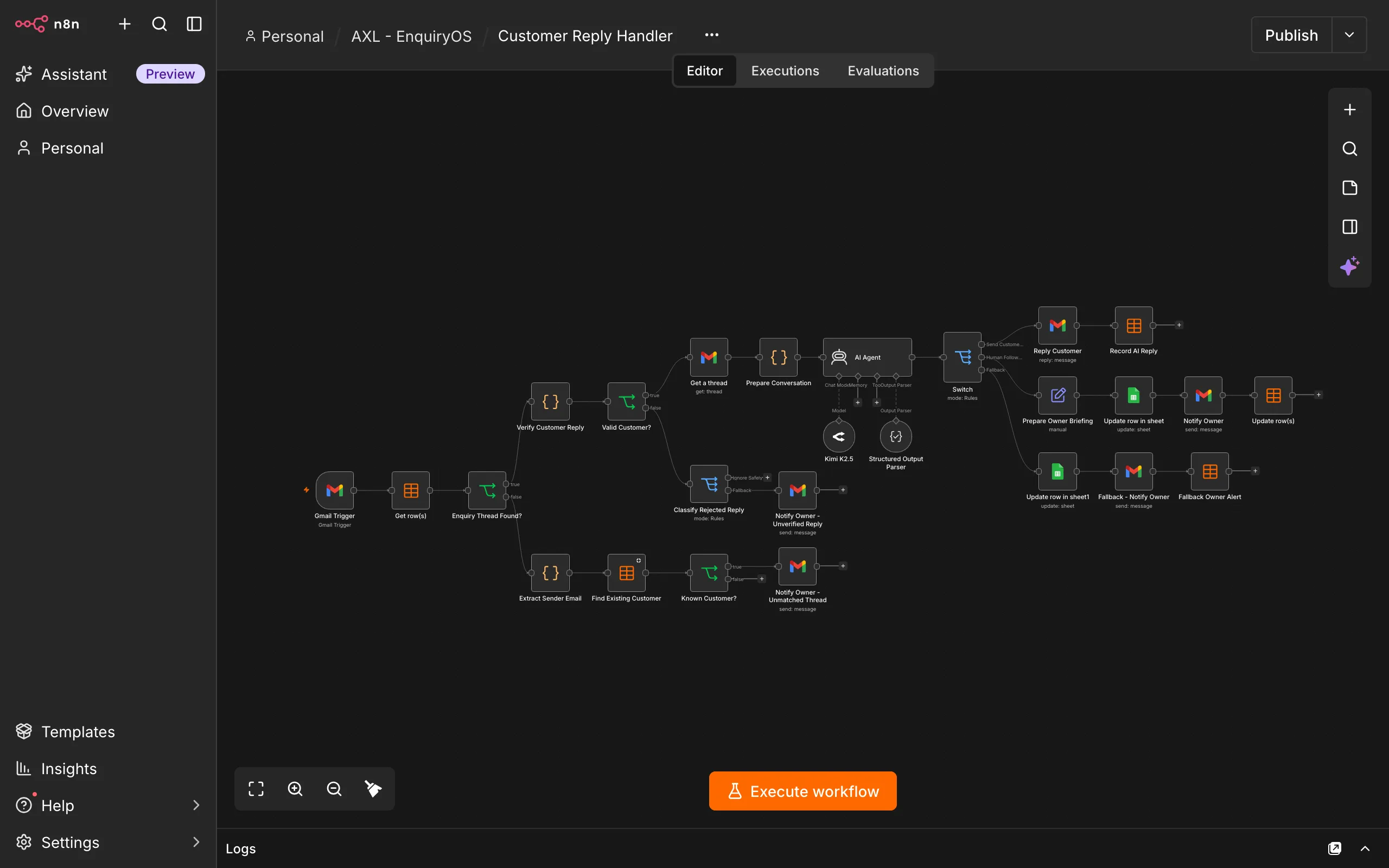
A Gmail Trigger receives an incoming message. The workflow looks up its threadId in enquiry_registry and checks the expected customer address and message identifiers.
Reject messages that should not be processed
Unknown threads, sender mismatches, invalid IDs, the original outgoing email, business-originated messages and previously processed message IDs must not trigger another automatic reply.
Read the existing thread
Retrieve the Gmail thread and prepare readable conversation history. Information the customer has already supplied should remain part of the response context.
Validate and route the decision
Prepare the customer continuation and, when needed, an owner briefing. Validate the structured outputs before replying in the same thread or notifying the owner.
Record what happened
Retain the incoming message ID, outgoing reply ID, reply time and owner-alert metadata so later runs can recognise completed processing.
What the owner sees
Quotations, commitments, approvals and unsupported requests are brought to the owner with the relevant conversation context and a clear next action.
The customer should not be asked the same intake questions again when their answers are already present in the thread. A sent continuation still does not complete the owner’s task.
Boundaries & recovery
Matching an email address is an application-level check, not proof of sender authenticity. Unknown or mismatched messages should remain outside automatic handling.
Replay handling, concurrent processing and recovery after a successful send but failed tracking update require explicit checks. Conversation content is untrusted input and must not change the workflow’s operating rules.
Acceptance checks
These checks cover the workflow’s inputs, outputs and recovery paths.
- A registered customer reply is associated with the correct original enquiry.
- The response uses existing conversation history without repeating answered questions.
- Unknown threads, sender mismatches and business-originated messages do not receive automatic replies.
- Replaying the same message does not send another customer response.
- A request requiring both a safe reply and owner notification routes both actions.
- Reply identifiers and timestamps are retained, including a recoverable path after a failed status write.