




EnquiryOS / Workflow 02
Enquiry follow-up tracker
Capture incoming requests, prepare useful replies and keep track of what still needs your attention.
Demo with sample data, not client work.
About the project
Every enquiry should be captured, receive an appropriate next action and stay visible until it has been handled. This workflow connects incoming requests, relevant replies and owner follow-up in one process.
For a small business, responding to an enquiry involves more than sending an email. Someone needs to record the request, check whether it has arrived before, find the right information and follow up on anything unresolved.
This guide explains the process and the decisions that remain with the owner.
- Project
- Enquiry follow-up tracker
- Tools
- n8n · Google Sheets · Data Tables · OpenRouter · Gmail
- System
- Axelyn EnquiryOS
How it works
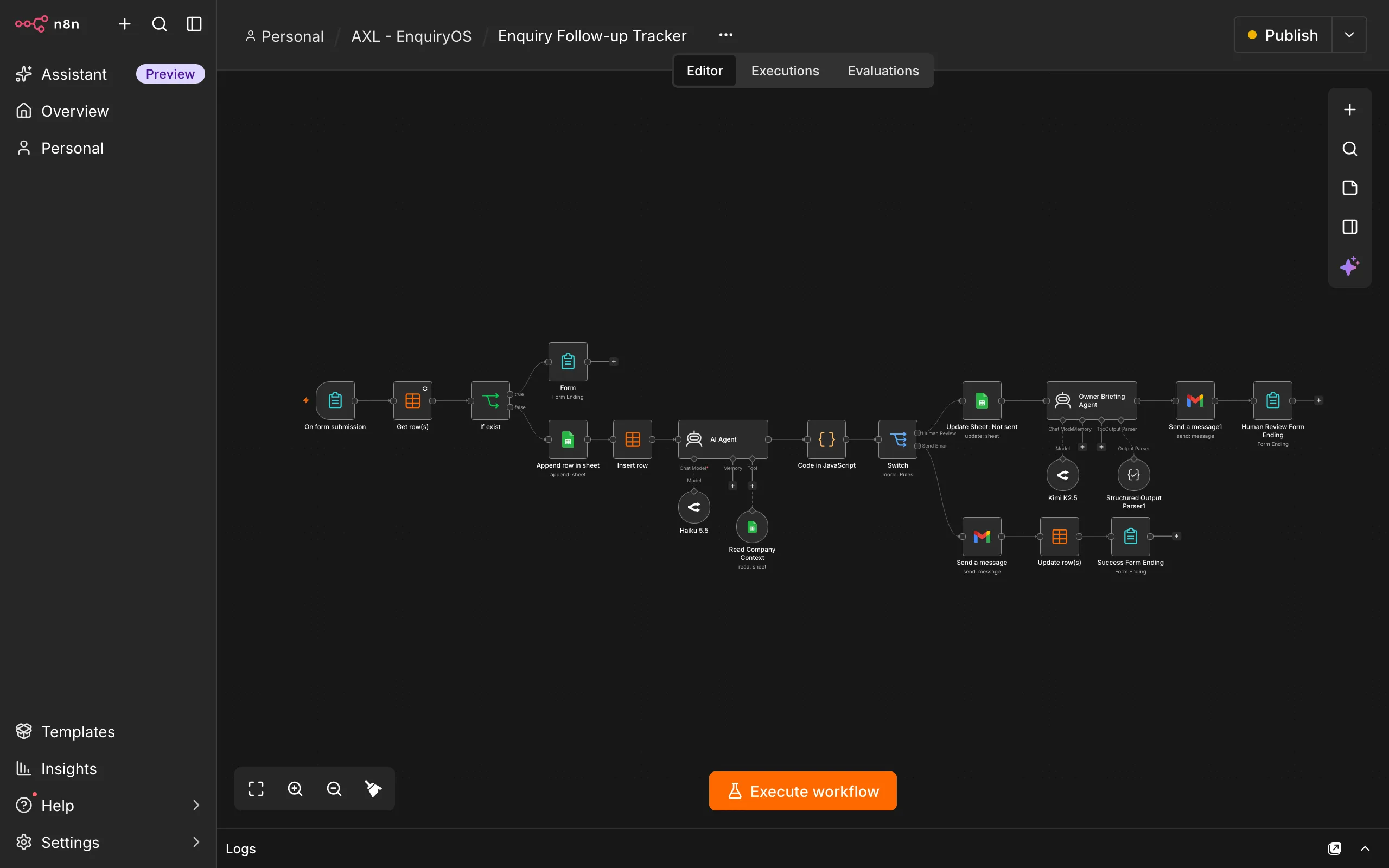
Validate the request and check for duplicates
The workflow checks the submission and compares the email and enquiry text with recent entries in n8n Data Tables. An identical request within five minutes receives an already-received confirmation. A different request, or one outside that window, continues normally.
Record the original enquiry
A valid new request is registered in Google Sheets and the duplicate registry. The record keeps its own ID, submission time, customer details and original message, so the owner can trace what arrived.
Prepare a reply using company information
The workflow reads the maintained company knowledge to prepare a relevant response. It must not invent services, prices, timelines, guarantees or policies. Missing information and requests that need judgment go to the owner.
Send a reply or brief the owner
n8n checks the response decision and controls sending through Gmail. When human attention is needed, the owner receives a concise briefing: what the customer wants, what was sent, what remains unresolved and the next action. The send decision and human-follow-up decision are independent: a safe customer reply and an owner briefing can both be required. A withheld reply stays unsent.
Keep the enquiry visible until it is handled
Email status and human-handling status are recorded separately. An automated acknowledgement does not close a quotation request or count as a completed human response.
Owner overview
The owner works from a central tracker and concise email briefings. They should be able to see what arrived, what the workflow has already done, what still needs attention and whether anything failed.
Each enquiry retains the original request, customer details, submission time, email status, human-handling status, follow-up reason, reminder timestamp and last processing error where applicable.
A sent email and a completed enquiry are separate events. If the customer needs a custom quotation, the request stays open until the owner has prepared and sent it.
Example enquiries
These fictional examples describe the intended behaviour. They do not submit an enquiry, send email or run n8n.
A routine question
A customer asks whether weekend appointments are available. If the maintained company information answers the question, the workflow can send a relevant reply and retain it in the record. The owner can review what was sent without rewriting the same answer.
A custom quotation
A customer requests a quotation for a setup across two branches. An acknowledgement may be sent, but the workflow does not invent a price. The owner receives the requirements, unresolved questions and a suggested next action. The enquiry remains outstanding until the owner responds.
Email status: Sent. Human-handling status: New. The quotation still needs the owner’s attention.
A repeated submission
The same email and enquiry arrive again within five minutes. The customer sees an already-received confirmation, and no additional email is triggered. The original record and its follow-up requirement stay intact.
An email failure
The enquiry is captured, but the outgoing email is not accepted. Its email status remains Failed. The original request and last error stay visible, and a functioning alert route should tell the owner what needs recovery. The request is not treated as successfully answered.
Follow-up & recovery
The EnquiryOS overdue monitor checks enquiries that need human attention. Once they are overdue, the owner receives a consolidated reminder with customer names, requests, waiting times, suggested actions and links to the records.
The demonstration uses a two-minute threshold to simulate a longer operational window, such as the next business morning. The threshold and frequency are configurable. An unchanged enquiry should receive the reminder once; marking it Replied excludes it from later reminders.
If a connection fails, the affected record must retain the error and the owner must be alerted through a functioning channel. Recovery should resume the failed step without repeating completed work. A failed send must never be recorded as a successful reply.
Production use also needs a concurrency-safe duplicate mechanism so simultaneous identical submissions cannot both proceed.
Validation
The checks cover new enquiries, duplicates, human review, reminders and failure recovery. They verify that automated communication is recorded separately from the owner’s outstanding work.
Acceptance checklist
- A valid new enquiry is recorded once in Google Sheets and the Data Table.
- An identical enquiry within five minutes is suppressed without another automated email.
- A different enquiry from the same customer continues normally.
- Replies use company context without invented facts.
- Gmail acceptance updates the email status to Sent.
- Human judgment produces a useful owner briefing and leaves follow-up visible.
- A rejected or withheld reply is not sent.
- An overdue enquiry produces one consolidated reminder.
- Marking Replied stops subsequent overdue reminders.
- A deliberately broken connection retains a recoverable error and alerts the owner.
- New, duplicate and human-review branches show the correct form completion screen.
- A request requiring both a safe customer reply and an owner briefing routes both actions without closing the human task.
Response time and time saved
The engineering target is Gmail acceptance within 60 seconds for 95% of successfully processed eligible enquiries. This target is not yet verified. Model latency, n8n execution, provider availability and Gmail processing affect the result; inbox arrival can take longer. The system does not promise when a person will reply. The complete EnquiryOS system coordinates this intake workflow with conversation handling, overdue monitoring, error alerts and owner reporting.
Validation should record capture and failure rates, median and 95th-percentile response latency, automatic replies, escalations, outstanding requests and duplicate suppression. Time savings require a timed comparison of manual handling with the human effort remaining after automation.
Tools & setup
n8n coordinates the process. Google Sheets holds the enquiry tracker and maintained company information, n8n Data Tables checks recent duplicates, OpenRouter supports drafting and classification, and Gmail sends the agreed emails.
The EnquiryOS introductory package is RM290 for one-time configuration with an agreed workflow selection. It does not automatically include all five workflows. Hosting, model usage, account charges and ongoing support are separate. Suitability and acceptance checks come before release.
View the setup package